
Scenario modeling
Before you sign a term sheet, you want to know where everyone lands. Scenario modeling runs a pro-forma priced round over your live cap table - converting every outstanding SAFE on its own terms - so you can see the new ownership and dilution before you commit.
A priced round changes everyone’s ownership at once: new investors buy in, your outstanding SAFEs convert to stock, and the option pool usually gets topped up. Scenario modeling does that whole calculation as a what-if. It reads your current cap table, applies the round you describe, and shows the result. Run it as many times as you like.
Open the model
Open Cap Table → Model and pick Round pro forma, or click Model a round (pro forma) on your cap table. It reads your company as it stands today and pre-fills a row for each outstanding SAFE, so you start from your recorded terms. Anyone who can view the cap table can run it.
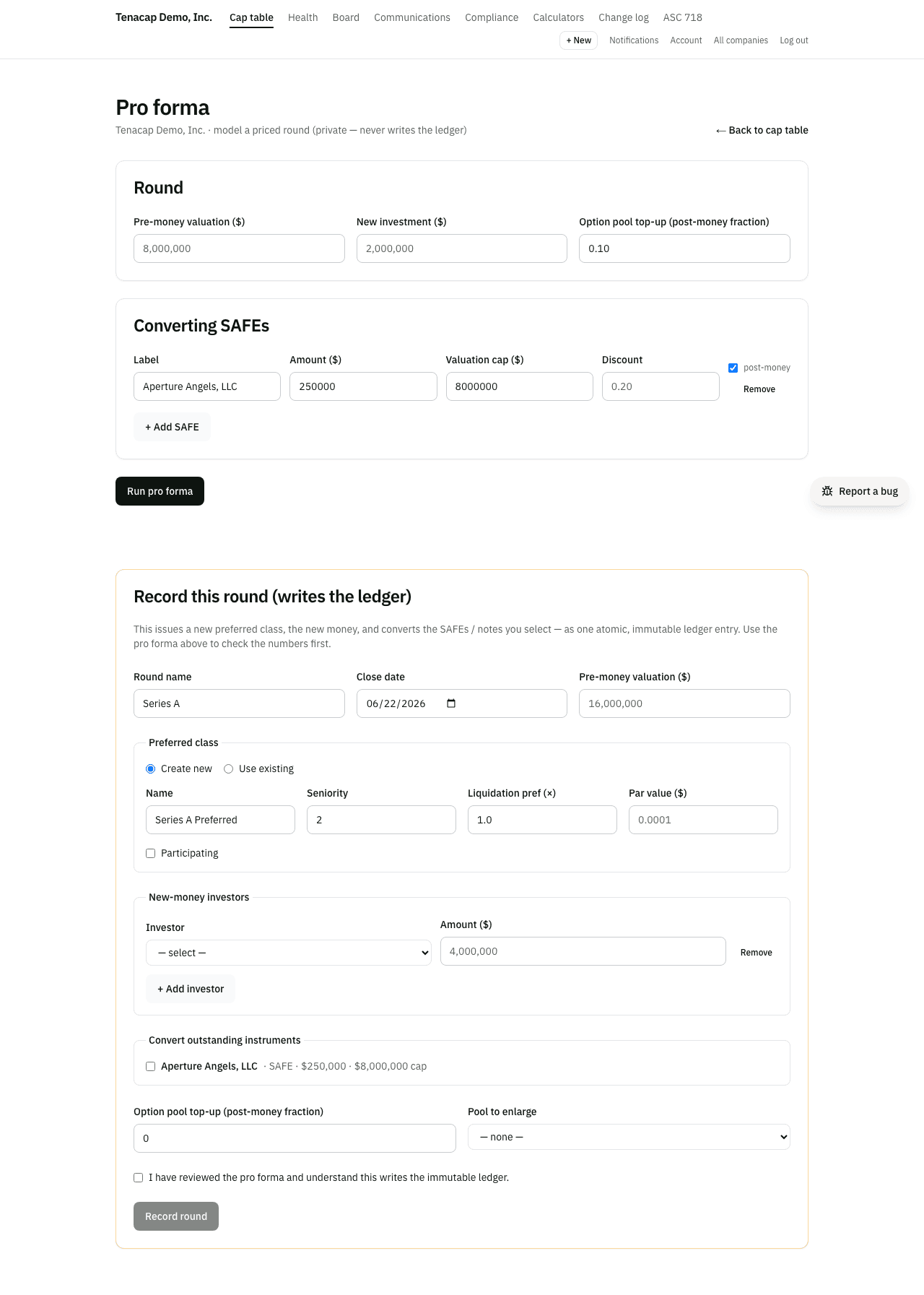
Set the round inputs
The round itself is three numbers and a date:
- Pre-money valuation - what the company is worth before the new money goes in. This sets the round price per share.
- New investment - how much new money the round raises. New shares are issued at the round price to cover it.
- Option pool target - the size of the unissued pool after the round, as a fraction of post-money fully diluted (for example,
0.10for ten percent). Tenacap adds only what the existing unissued pool is short of that target, and counts the increase in the pre-money share count (the pre-money shuffle). Enter0to leave the pool alone. - Round closes on - the closing date, today unless you change it. Convertible notes accrue interest up to this date.

How SAFEs convert
Each outstanding SAFE is its own row: amount, valuation cap, discount, and a post-money box (untick it for a pre-money SAFE). Edit any row, or use + Add SAFE for one you are still negotiating. When you run the model, each SAFE converts at the lowest of its cap price, its discount price and the round price, as described in SAFEs & convertibles.
The results list each SAFE with the price it converted at and the shares it became.

How convertible notes convert
Every outstanding convertible note on your cap table converts in the model automatically, on the terms recorded on the note. You do not type notes in; the form lists the ones that will convert. Each note converts its principal plus the interest accrued to the round date, at the lowest of its cap price, its discount price and the round price. This is the same reading and the same arithmetic the record panel uses when you record the round.
A note’s cap is divided by fully diluted before the notes and SAFEs convert when the cap is pre-money, and by fully diluted with them converted, the note’s own shares included, when it is post-money. Each note is its own row in the results; open it to see the math: the interest, each candidate price, and the shares. A note that does not record whether its cap is pre-money or post-money is converted as pre-money and marked pre-money assumed; a note with no cap is marked no cap. Set the cap basis with Edit terms on the note.
A note’s count also includes the option pool increase the round makes, as the standard note form defines it, unless the note records that it leaves the increase out; see how a note counts the pool. When a round has an increase and the note does not say, the note’s math says the increase was included as an assumption.
Reading dilution & pool impact
The results show:
- Round price/share, New-round shares, Pool increase and Post-round FD.
- Post-round ownership - each existing holder, each converted SAFE, the new money as one line, each converted note, granted options, the unissued pool and the pool increase, with shares and post-round percentage.
- Dilution of existing holders - each holder’s fully diluted percentage before and after.
Saving the modeled view
The modeled cap table stays on the results screen while you keep it open. Once you record the round, your live cap table is the source of truth, and you can export it any time from Export & open schema.