
Compliance & tax
A few US tax and securities rules shape every C-corp cap table: the fair market value your options are priced from, the 83(b) deadline, the Rule 701 limit, Form 3921 for ISO exercises, the ISO $100k limit and AMT, and the QSBS clock. Tenacap tracks each one from your records and shows the dates and figures on one Compliance page. It prepares data and reminders; it files nothing with the IRS or the SEC.
Where to find it
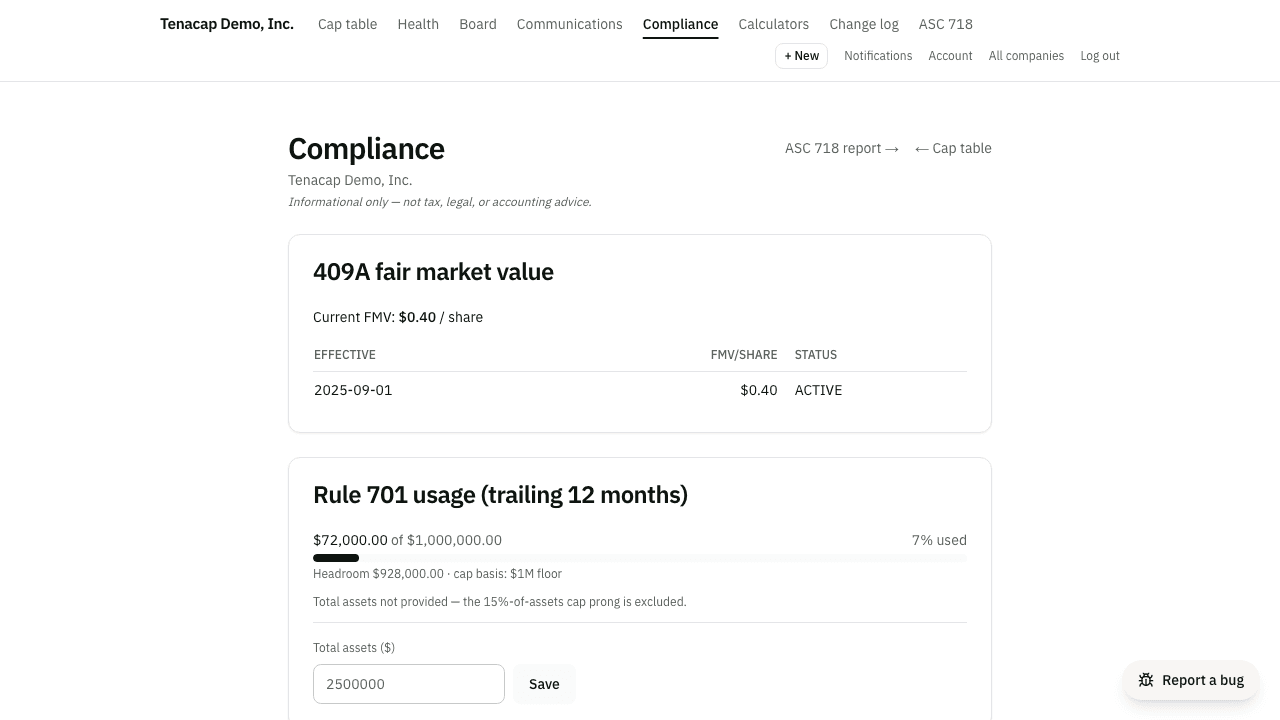
Open Compliance & Tax → 409A in the left navigation. The page it opens is titled Compliance and holds, top to bottom: fair market value, Rule 701 usage, 83(b) elections, Form 3921, the ISO $100k limit, AMT, ISO dispositions and a QSBS count. The same navigation group has separate pages for Option Holdings (one row per grant), QSBS, the ASC 718 report, and DE Filing for Delaware companies. For an LLC the Compliance page says these rules do not apply; see Tenacap for LLCs.
409A valuations
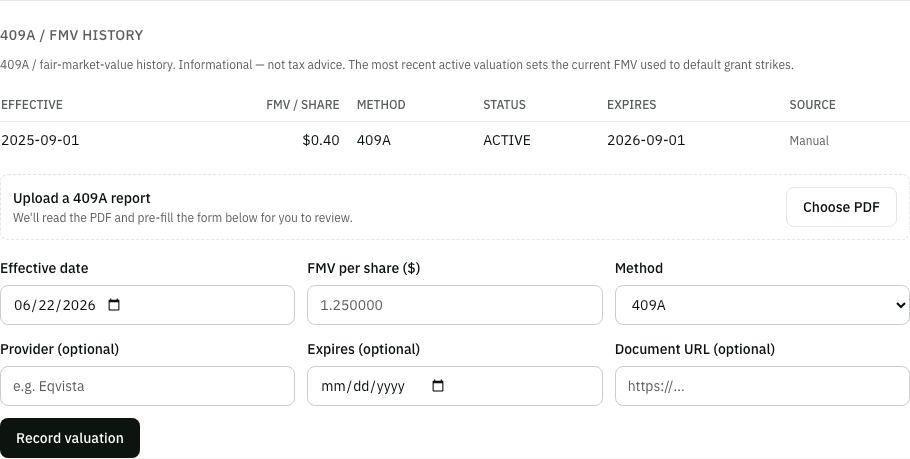
A 409A valuation sets the fair market value (FMV) of your common stock, which sets the minimum strike price for option grants. Record each valuation with its effective date, FMV per share, method (409A, board determination, or other), provider, and an expiry date. The expiry is the last day the valuation counts as current; an independent appraisal is presumed reasonable for up to 12 months, so the import form defaults it to one year after the valuation date. The valuation whose window covers today is your current FMV.
The current FMV pre-fills the strike on new option grants (with a warning if you set a strike below it), prices the estimated value in the stakeholder portal, and supplies the FMV at exercise for Form 3921 and the AMT figures below. Tenacap can email your admins as a valuation nears its expiry and once it lapses.
If you don’t have a 409A yet
That is normal for a young company. Grants are usually priced from a board of directors fair market value determination: the board resolves what the common stock is worth.
To record one, open the Compliance page and use Record one you already have (with nothing on record yet, the link reads Record a board determination), or go to Structure → 409A / FMV history. Set the method to board determination and enter the effective date and FMV per share from the resolution. Attach the signed resolution PDF now or later. Recording a valuation takes the Admin role. From then on it is your current FMV and does everything above.
Import your 409A report
Admins can upload the PDF your 409A provider sent, under Record a valuation you already have on the Compliance page or Structure → 409A / FMV history. Tenacap reads the report and pre-fills FMV per share, valuation date, expiry, provider and method for you to review. Fields it could not read with confidence are highlighted, and it warns if the FMV is far outside the range implied by your latest priced round and earlier valuations. Nothing is saved until you confirm, and the PDF is kept with the valuation.
Correct or void a valuation
In the valuation history on the 409A page, admins see Correct and Void beside each valuation. Correct fixes the FMV per share, effective date or method in place, for a typo or a figure keyed in before the discount. Void marks a valuation entered in error: it stays in the history, struck through, but no longer counts as current, so it stops pricing option grants and the next valuation in line takes over. Each writes an entry to the company’s audit trail with the figures before and after. When you void a valuation, a box opens on the page and asks why. The reason is optional, for example “Entered twice by mistake”. It is kept in the audit trail and shown beside the row in the history. Leave it blank to void without one, or choose Cancel to leave the valuation as it was.
A valuation recorded without an expiry date shows No stated expiry in the history. It still counts as current until a newer valuation takes over, so add the expiry with a new record if your report states one.
A second valuation for the same date
If you save a valuation for a date that already has one, Tenacap shows what is on file and asks what to do. Replace the one on file marks it entered in error and keeps it in the history. Keep both is for a real second record, such as a corrected appraisal with a different price, or a board determination beside a 409A.
If the new valuation matches one on file in every figure (same date, method and price per share), Tenacap says it is already on file and does not offer Keep both, because two copies of one report only clutter your history. You can still replace the one on file, for example to attach the report to the new record. The same rule applies to a correction that would turn one valuation into a copy of another, and to a report you confirm from a 409A order. If copies were saved before this check existed, the equity health card lists them so you can void the extra one.
With an assistant
An assistant connected to Tenacap can do each of these too, as a proposal an admin confirms: record a valuation, correct or void one, and confirm the report from a 409A order. It can also send Tenacap a 409A report PDF of up to 3 MB to read: it gets the same pre-filled figures you would, checks them against the report, and proposes the valuation with the PDF attached. Nothing is recorded until an admin confirms. A larger report is uploaded here in the app.
Grant coverage & board valuations
Each outstanding option grant needs a valuation in effect on its grant date to support its strike price. The Compliance page sorts every grant into one of three states: 409A on file, board-valued (a board or other-method valuation covers it), or no valuation on record. Next to each grant with no valuation, Add board valuation opens the valuation form with the method set to board and the effective date set to the grant date.
The list covers more than outstanding grants. A grant’s pricing is fixed on its grant date and still matters after it is exercised, so the list also includes exercised grants, and cancelled or lapsed grants that had an exercise. A Status column says which each one is: Outstanding, Exercised or Closed. The heading says how many are still outstanding, and only those count toward the equity health score.
Order a 409A from Tenacap (coming)
Tenacap does not perform valuations; a 409A is an independent appraisal. You will be able to order one from the Compliance page through our appraisal partner, 409.AI. Tenacap sends 409.AI the cap table it already holds and asks you only for what it does not have: the valuation date, a contact, your website and a short company overview.
Start with Start a 409A. The order then shows one step at a time. First, Pay 409.AI opens their secure checkout, priced at Tenacap’s referral rate for how much the company has raised; you pay 409.AI directly, and Tenacap takes no cut and never sees your card. Then Answer 409.AI’s questions signs you in to 409.AI to finish their questionnaire (your financials and a few questions only you can answer). The appraisal starts when you submit it there. Placing the order e-mails you these steps, and while an order is open a banner at the top of the page says what comes next.
The order’s status shows on the page as 409.AI works. When the final report arrives, 409.AI’s price per share and the report’s dates are pre-filled for you to confirm, as with a report you upload yourself. The record is labelled as a partner referral.
An assistant can propose an order or answer the partner’s questions on one, but only an admin places it, by confirming in the app. The proposal says plainly that confirming opens an order with a firm outside Tenacap and sends it your cap table. An assistant cannot pay or sign in to 409.AI for you; those are the two steps on the order.
83(b) election tracking
An 83(b) election asks the IRS to tax restricted stock when it is bought rather than as it vests. Tenacap creates an election record when you issue restricted stock with the 83(b) option on, when someone early-exercises unvested options, or when you add one under Update → 83(b) elections.
- Deadline: the purchase date plus 30 days. When day 30 falls on a Saturday, Sunday or District of Columbia legal holiday, the deadline moves to the next business day (IRC §7503).
- Status: not filed, filed, late, or not applicable. An election still unfiled after its deadline is marked late by a daily check.
- Reminders: the holder is emailed 10, 3 and 1 day before the deadline, and again once it passes. If Tenacap has no email for the holder, your admins get the notice instead, and the Compliance page flags the holder.
- Election PDF: under Update → 83(b) elections, each election downloads as a cover page plus the election statement. The cover page spells out what to do with it: review and sign, mail the original to the IRS office where the holder files their return by the deadline above, send it by certified mail with return receipt requested, give a copy to the company, and keep one. The election statement itself is written to the content requirements of Treas. Reg. §1.83-2(e) and filled in from the record; it is not IRS Form 15620. The taxpayer ID line is blank because Tenacap does not hold Social Security numbers, as are the company’s street address and EIN. It is a draft to review with an adviser, and filing it is the holder’s responsibility. See Restricted stock & 83(b).
Once an election is mailed, use Mark 83(b) filed on Option Holdings, or Mark filed under Update → 83(b) elections. Both record today as the filed date; a date after the deadline is recorded as late, not filed, and the row reads filed late. The same panel marks an election N/A when an 83(b) does not apply, and links an older election to the restricted stock or early-exercised grant it covers.
A connected assistant can do each of these too, as a proposal you confirm: add an election (record_83b_election), link one to its security (link_83b_security), mark it filed (mark_83b_filed), or set it to not filed, late or not applicable (set_83b_status). Every answer states the filing deadline and whether it has passed. See Connect your assistant.
If you already hold an executed 83(b), filed through Stripe Atlas or a law firm, attach it on the holder’s page under Documents with the kind 83(b) election. Option Holdings then shows Copy on file, and the holder can open it from their portal. A holder can also tell you, from their portal, the date they mailed it; that shows as Attested, copy not on file. Neither changes the status. Marking the election filed is your statement that it went to the IRS.
Rule 701 limits
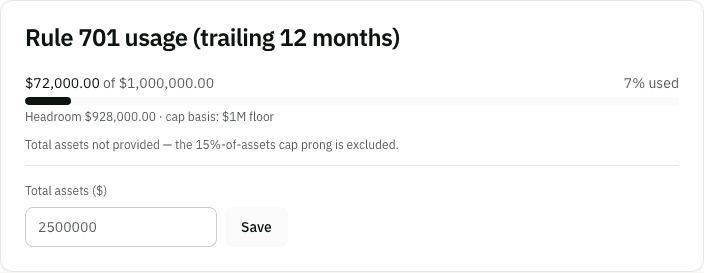
Rule 701 is the SEC exemption that lets a private company offer equity under written compensation plans without registering it. In any 12 months, the amount sold under it may not exceed the greatest of $1 million, 15% of total assets, or 15% of the outstanding class. The Rule 701 card shows your usage over the trailing 365 days, the cap and which prong set it, your remaining headroom, and a warning at 90% of the cap.
How Tenacap computes it:
- Usage: each option grant counted on its grant date at exercise price times number of shares, as Rule 701(d)(3) requires. Exercised grants still count.
- 15% of total assets: from the Total assets figure an admin enters on the card. The rule measures it at your most recent balance sheet date, no older than your last fiscal year end, so use that balance sheet. Without it, this prong is skipped. A connected assistant can propose the figure too, with the
set_rule_701_total_assetstool; its proposal shows the cap and headroom before and after, and nothing changes until an admin confirms it. - 15% of the class: Tenacap uses 15% of the dollar value of your outstanding shares at the current FMV. The rule measures this prong as a count of securities, so this figure can differ from what the rule allows. Without a current FMV, this prong is skipped.
- $10 million: above $10 million sold in 12 months, the rule requires extra disclosure to recipients; the card flags it.
Form 3921
A company must file Form 3921 with the IRS for each incentive stock option (ISO) exercise, and give the employee their copy by January 31 of the following year, or the next business day when January 31 is a weekend or legal holiday (February 2, 2026 for exercises in 2025).
- The Form 3921 (ISO exercises) card lists each reportable exercise: employee, exercise date, shares, strike and FMV at exercise. FMV at exercise comes from the valuation in effect that day; with none on record it is blank.
- Exercises brought in from a Carta or Pulley import are listed too, marked Imported. Those from a year before your company joined Tenacap are marked Imported, before Tenacap: their forms were due while your prior provider kept the records, so confirm they were furnished. They are never counted as overdue. If the source file had no share count for an exercise, it shows as Quantity unknown; if it had no date, the incorporation date stands in and the row says Date not in import. Check either with your prior provider.
- Download CSV exports every ISO exercise on record with grant date, exercise date, strike, FMV at exercise and shares, for whoever prepares your forms. Tenacap does not produce the form itself.
- Where an exercise crosses the ISO $100k limit (below), only the ISO-qualified shares are reported; the rest are nonqualified options and are left off.
- On Option Holdings, each exercise shows as upcoming until the furnish-by day has passed and due after it. The button labelled Generate Form 3921 records that you issued the forms and moves the exercise to issued; it does not create a form. A grant whose only open exercises were imported from before Tenacap shows Before Tenacap, and its button reads Mark Form 3921 issued.
Filing Copy A with the IRS is a separate, later deadline (for 2025 exercises, March 2, 2026 on paper or March 31, 2026 electronically). Tenacap does not track it.
ISO $100k limit, AMT & dispositions
- ISO $100k limit (§422(d)): ISOs that first become exercisable in one calendar year count as ISOs only up to $100,000 of value, measured by FMV at grant. The card splits each employee’s options into ISO-qualified and excess, working through grants in grant order. The excess is treated as nonqualified options.
- AMT: holding ISO shares past the end of the year of exercise adds the spread (FMV at exercise minus strike) to alternative minimum taxable income. The card shows that amount per employee per year. An optional estimator takes the employee’s filing status, other income and regular tax, which Tenacap does not hold, and estimates AMT owed for tax years 2024 to 2026.
- Dispositions: record a sale of exercised ISO shares and Tenacap marks it qualifying (held more than 2 years from grant and more than 1 year from exercise) or disqualifying, with the ordinary income a disqualifying sale creates. A sale is recorded against an ISO exercise recorded in Tenacap; one dated before the exercise, or for more shares than the lot has left after the sales already recorded, is refused. An AI assistant can propose a sale with the
record_iso_dispositiontool, and its proposal shows the classification, the ordinary income and the capital gain before a person confirms it.
These are estimates to help you and your adviser see what an exercise might trigger. The tax is the employee’s, and their return is prepared by their adviser.
The QSBS clock
Qualified Small Business Stock (QSBS) can let shareholders exclude some or all of their gain from federal tax if the stock is held long enough and other conditions hold. The Compliance page shows a count of holdings inside and past the holding period; the QSBS page has the per-holding clock, the gross-assets and active-business tests, and what Tenacap does not check.
A connected assistant can propose the two QSBS inputs an admin records: a gross-assets figure on a date (record_qsbs_gross_assets), and the yes or no answer for a tax year to the active-business question (record_qsbs_attestation). The answer is a statement in the company’s name, so the assistant only drafts it; the admin who confirms it is recorded as the person who attested. The same goes for the ASC 718 valuation assumptions (record_asc718_assumptions): the proposal shows the grant-date fair value and expense before and after. See Connect your assistant.