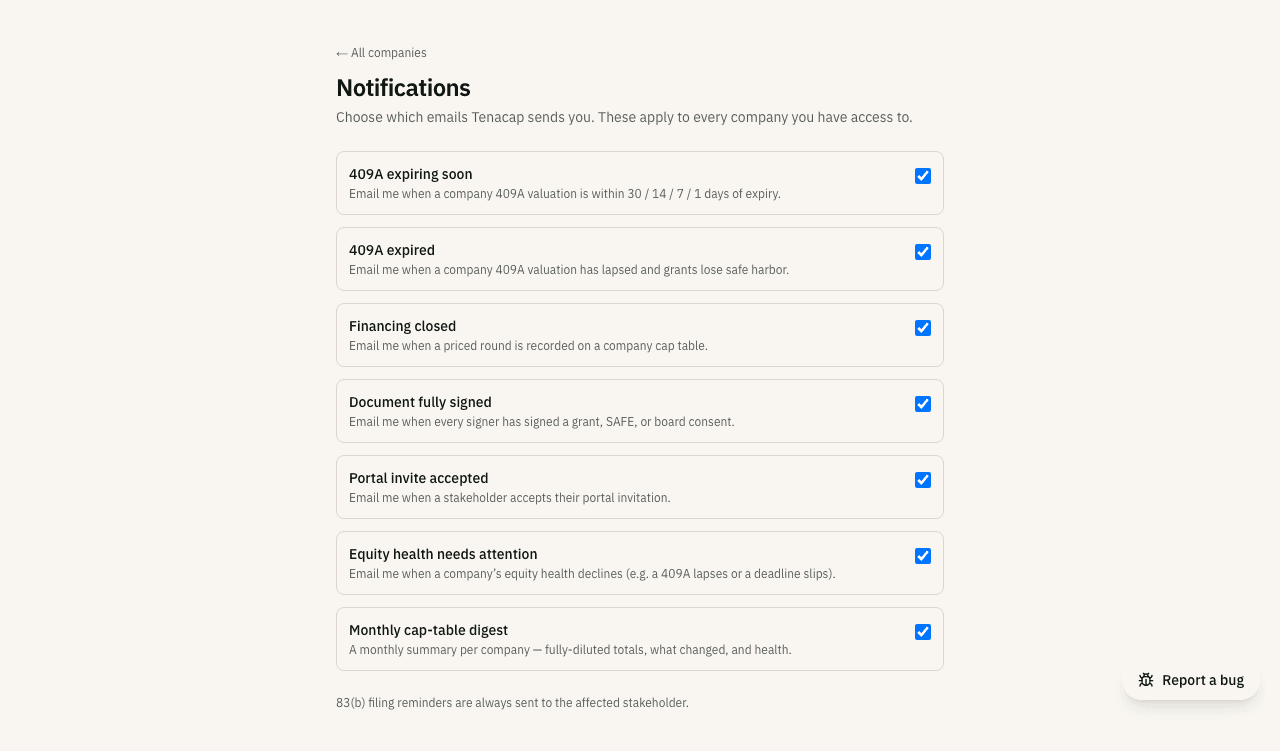
Email notifications
Notifications email you about time-sensitive items - a 409A about to expire, an 83(b) deadline approaching - before they become a problem.
Tenacap’s health signals show the time-sensitive items on your cap table when you go looking. Notifications push the most urgent of those to your inbox on a daily schedule.
What you get notified about
Time-sensitive compliance clocks:
- 409A expiring - a heads-up at 30, 14, 7, and 1 days before a company 409A valuation lapses, so you can line up a refresh before grants lose their safe-harbor strike price.
- 409A expired - a notice the moment a valuation has lapsed.
- 83(b) filing deadline - a reminder at 10, 3, and 1 days before the 30-day window closes (counted to the next business day when day 30 is a weekend or holiday), plus a notice if it passes unfiled.
- Equity health needs attention - when a company’s health grade slips (for example B to C), so you can see what changed.
- Departed holder’s exercise window - when someone is marked departed with options outstanding, you hear the day it is recorded (the window is open, closing on a named date), again 14 and 3 days before it closes, and once more if it closes with no answer recorded. Each email links to the update page where you record the exercise or confirm the grant lapsed. The closed-window email is one list per company naming every holder still waiting on an answer, re-sent only when another window closes.
And the moment something happens on your cap table:
- Financing closed - when a priced round is recorded.
- Document fully signed - when every signer has signed a grant, SAFE, or board consent.
- Portal invite accepted - when a stakeholder joins the portal.
- Tenacap added a member - when someone on the Tenacap team adds a person to your workspace. Goes to your workspace’s admins only.
- A holder asked to exercise options - when a stakeholder asks, from their portal, for an option exercise to be recorded: how many, with any note they left, and a link to the update page with the exercise form open on that grant. Nothing is on the cap table until you record it. Once per request, per person.
- An assistant proposed a change - when an AI assistant connected to Tenacap proposes a change you have the role to confirm, with a link to the proposal. Once per proposal, and at most twenty proposals a company per hour. See Confirming what an assistant proposes.
And once a month, a recap:
- Monthly cap-table digest - a per-company summary of the prior month: fully-diluted totals, what changed (issuances, conversions, exercises), the current equity-health grade, and any open action items.
Who receives what
409A alerts and cap-table events (financing closed, a document fully signed, a portal invite accepted) go to a company’s admins and editors. 83(b) reminders go to the stakeholder who needs to file. Each reminder threshold (for example, the 14-day and 3-day exercise-window warnings) sends at most once - it will not repeat, but a later threshold for the same deadline is its own email.
If we have no email address for a holder - common right after an import, since some providers export no stakeholder emails - we cannot send them the 83(b) reminder. We email the company’s admins and editors, naming the holder and the deadline, so someone can reach them another way. The holder also shows as “No email on file - we can’t remind them” beside the countdown on 409A & compliance and in Option Holdings. Adding their email address puts them back on the automatic reminder.
Choosing your emails
Open Accounts → Notifications in the left navigation (or visit notification settings) to turn each notification on or off. Your choice applies across every company you have access to. Compliance alerts are on by default for admins and editors.