
Restricted stock & 83(b)
Restricted stock is how most founders hold their shares: bought up front at a low price, vesting over time, with the company able to buy back whatever isn’t vested if you leave. Tenacap issues it, with or without vesting and from your equity plan or outside it, generates the purchase agreement or files the one you already signed, and tracks the one deadline that matters - the 83(b).
When founders take stock at incorporation, they almost always take restricted stock: they pay for the full grant up front at par, but the company keeps the right to repurchase any shares that haven’t vested. One Tenacap form issues the holding onto your cap table, attaches the vesting schedule, generates the purchase agreement to e-sign (or files one already signed), and starts the clock on the 83(b) election.
What restricted stock is
A restricted stock holding has two halves: the purchase (how many shares, at what price per share, with the par value of the chosen class) and the vesting schedule that governs when the company’s repurchase right lapses. The founder owns the shares from day one; with an option grant, ownership begins at exercise. If you’re comparing the two, see Options & vesting.
Restricted stock and your equity plan
Restricted stock granted out of an equity incentive plan uses up that plan’s reserve, share for share, as an option grant does. A standard plan reserves shares for “Awards”, and restricted stock is one of them - so a 100,000-share RSA leaves 100,000 fewer shares to grant later. Tenacap counts it in the plan’s Granted figure and takes it out of Available.
Founder restricted stock issued outside any plan consumes no reserve. On a holder’s page an award shows the plan it came from, or a dash when there was none.
To issue new restricted stock from a plan, pick the plan in the issuance form (below). If restricted stock already on your cap table came from a plan but was recorded outside it, an admin can say which plan with Comes from plan…, on the holder’s page or on the Equity plans page. The plan’s Available then falls by those shares, and if the plan’s reserve is recorded on your cap table, the reserve falls with it, freeing that room in the class. Choosing Outside any plan there takes it back. The plan needs that many shares available before stock can be tied to it, and when its reserve is recorded, taking the stock back out needs room in the class. Cancelled or bought-back restricted stock can’t be tied to a plan.
If a plan and your issued shares together come to more than your charter authorizes, restricted stock granted from the plan but recorded outside it may be the reason: it is counted once as issued stock and again among the shares the plan has left. Tying it to the plan counts it once.
Issuing restricted stock
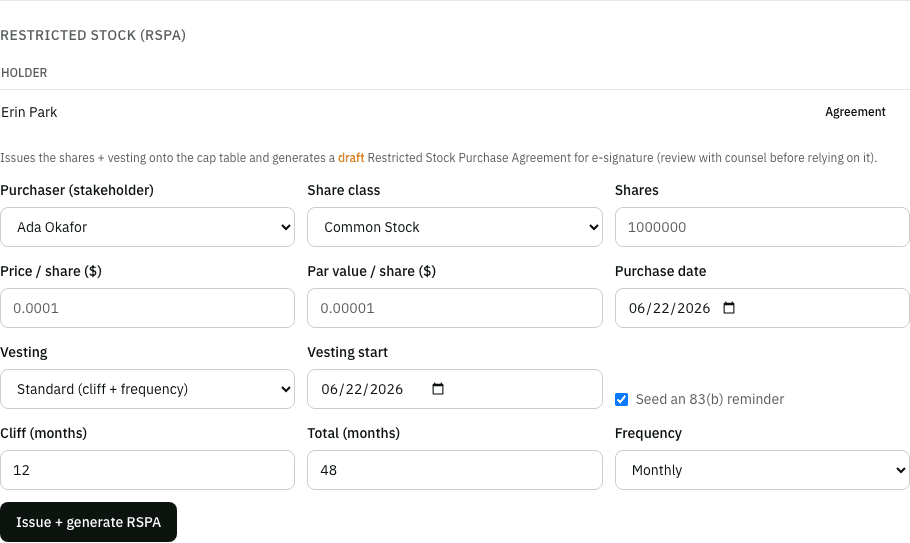
Open Cap Table → Update and, in the Issue group, choose Restricted stock (RSPA) (editors and admins). The form asks for:
- Purchaser - the stakeholder receiving the shares.
- Share class - usually Common Stock. The class’s par value is filled in for you.
- Plan - the equity plan the shares are granted under, or Outside any plan, the default and the usual choice for founder stock. The list shows the plans on the chosen class with the shares each has available. A plan not tied to a share class yet isn’t listed until you tie it under Structure.
- Shares and Price / share - the number of shares and what the purchaser pays for each. When Tenacap has a fair market value on record, from a 409A valuation or a board determination, the price starts at it, with its date; change it if the purchase price is different.
- Purchase date - the date the shares are bought, which starts the 83(b) clock.
- Vesting - None, fully vested at purchase, a standard schedule (cliff months, total months and a frequency, such as a 12-month cliff then monthly over 48 months) or custom milestones. With a schedule you also set the Vesting start, the vesting commencement date, which can be earlier than the purchase date.
- Agreement - Draft Tenacap’s founder RSPA to send for e-signature, or I have a signed agreement to upload the agreement already signed (a PDF, an image or a Word file, up to 4 MB). With no vesting only the second is offered: the founder RSPA is a vesting and repurchase agreement.
Issuing commits the share ledger entry, the vesting schedule and 83(b) election when there is vesting, and the agreement record as one action. Outside any plan it is an ordinary issuance, so the class needs room for it (see how many shares you can issue). From a plan whose reserve is recorded on your cap table, the shares come out of that reserve in the same step, so the plan needs enough available but the class needs no room beyond it. From a plan whose reserve is not recorded yet, it needs room like any issuance.
A signed agreement you upload is attached to the new grant right after the shares are issued, and listed under Documents on the holder’s page. Tenacap checks the file before it issues anything; if the upload still fails, the form says so and lets you attach it again.
Generating the RSPA
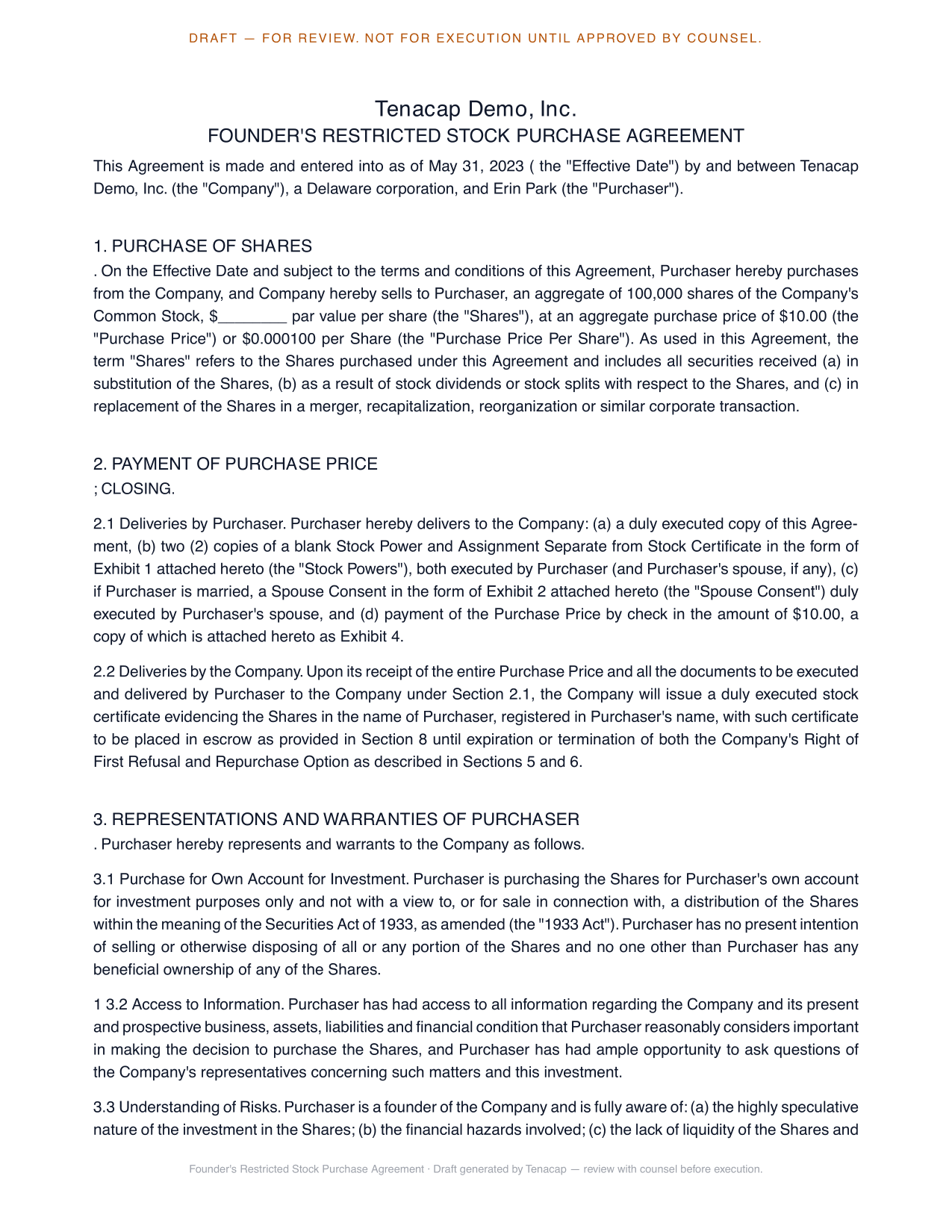
Unless you upload a signed agreement, the same action produces a Restricted Stock Purchase Agreement (RSPA) - a standard founder-form agreement filled in with the purchaser, share class, quantity, price, and a plain-language description of the vesting and repurchase terms you chose. From the holding’s Agreement expander you can preview it, request a signature, and download the signed copy with its completion certificate once it’s executed. The signing flow is the same one used everywhere else in Tenacap; see Documents & e-signature for how sending, signing, and sealing work. A holding with no vesting schedule has no founder RSPA, so its row has no Agreement expander; the agreement you uploaded is under Documents on the holder’s page.
The 83(b) election
An 83(b) election tells the IRS you want to be taxed on the value of your restricted stock now, at purchase, rather than as it vests. A founder who pays the full fair market value reports no income at purchase with the election. Without it, each tranche is taxed as it vests, on its value then less what was paid for it. With a vesting schedule, the issuance form has a Seed an 83(b) reminder checkbox, checked by default - leave it checked and Tenacap creates an 83(b) election alongside the purchase, computes its filing deadline (the purchase date plus 30 days, moved to the next business day when day 30 falls on a weekend or a legal holiday), and tracks it as not filed until you mark it filed. Shares fully vested at purchase are not subject to forfeiture, so their value is already counted at purchase without an election (IRC §83(a)): with vesting set to None the checkbox is hidden and Tenacap tracks no election.
Tenacap also prepares the election document. Under Update → 83(b) elections, Election PDF on the election’s row generates a printable Section 83(b) election carrying everything we already hold: your name and address, a description of the shares, the date of transfer and taxable year, the vesting restrictions in plain language, the fair market value in force on the transfer date, and the amount you paid. It prints twice - the copy you file with the IRS, and the copy you must furnish to the company.
Once you mail your election, mark it filed (and optionally attach the letter) so the holding’s status stays accurate. All of your elections, with their deadlines and reminders, are gathered on the compliance page - see Compliance & tax.
Repurchase on departure
The point of vesting is the company’s right to buy back unvested shares if the holder leaves. The schedule you attach at issuance defines when that right lapses: as shares vest, they become the holder’s to keep; anything still unvested at departure is subject to repurchase, typically at the original purchase price. The schedule lives on the holding, so the vested-versus-unvested split is current on the holder’s page and in their portal view.
When the company exercises that right, record it as a buy-back (Buy back shares on the holder’s page). The repurchased shares stay issued, in treasury, until the board retires them, and Tenacap lists the retirement as a pending board action.